Buyer Inquiry Chatbot Workflow: Build a Clear Agent Brief
An original buyer intake walkthrough with fictional listing data, optional requirements, corrections and a structured agent brief.

A buyer’s first message often contains useful information before an assistant asks a single question. Someone might name a property, give a rough purchase budget, and ask about a weekend viewing in the same sentence. A buyer inquiry chatbot workflow should preserve that context, clarify only what matters next, and give the agent a brief the buyer can correct. Replacing that message with a long fixed questionnaire can lose the details that made it useful.
This guide walks through one original fictional US buyer inquiry, from the first property question to a structured handoff. It describes a proposed workflow, not an installed SchoolsAI listing feed, CRM connection, or booking system. No example represents a real client or property offer. The broader real estate inquiry workflow covers overall design; this article concentrates on buyer requirement fields, optionality, corrections, and the final brief.

1. Begin with the question already on the page
Start by identifying what the person wants now: an answer about a named listing, help organizing a property search, or contact with an agent. Keep the visitor’s exact listing reference separate from any property inferred from the page. If the two disagree, ask which listing they mean. A general search should not be silently tied to the last property the assistant displayed.
For the fictional example, the visitor says, “I saw BUY-R52. We’re looking for a two-bedroom condo around $475,000. Is there assigned parking?” The training record for BUY-R52 lists two bedrooms and one assigned parking space. Its asking price and current availability are unverified. The assistant can answer the approved parking question without pretending the property is available or within the buyer’s budget.
An opening could say: “I’m an automated inquiry assistant. The sample record for BUY-R52 lists one assigned parking space. Current availability and price need the agent to check. Would you like to ask another property question or share requirements for an agent?” Let the visitor get that answer before asking for a name or contact details. If they request a person immediately, offer the verified route and stop optional intake.

2. Record the buyer’s chosen location language
Ask for the locations the buyer explicitly wants considered, using their own terms. A city, named area, or a set of listing references may be enough for the first conversation. If a phrase is ambiguous, clarify it rather than selecting a neighborhood on the person’s behalf. Distinguish an exact requirement from an exploratory preference.
In the sample conversation, the buyer wants a condo in a named fictional search area, River District, but is open to other areas they select later. Record River District as the current stated preference and additional areas as not provided. Do not turn “open to options” into permission to invent location preferences or characterize who lives in an area.
A useful follow-up is: “Should I record River District as essential, or as your starting preference?” If the visitor asks which area is right for them, invite concrete property criteria they want to discuss and route broader advice to the agent. Keep the intake centered on explicit location choices and objective property questions. It should not infer personal characteristics or make housing-access decisions.

3. Keep the budget a stated search preference
Record the amount, currency, and basis the buyer provides. For a purchase inquiry, distinguish a stated purchase-price target from a monthly payment question. “Around $475,000” is an approximate preference; it is not proof of available financing, an approved offer, or the current asking price of BUY-R52. Store those concepts in separate fields.
Ask a narrow clarification if the basis is missing: “Do you mean a purchase-price target of about $475,000?” Let the buyer say they are still exploring or would rather discuss the figure with an agent. Do not require financial documents, bank balances, or a lending decision to answer an ordinary listing question. Questions about financing, payments, taxes, or contracts belong with the appropriate qualified person.
When the person later changes the target to “up to $495,000 purchase price,” replace the active requirement and label it as visitor stated. Keep the earlier amount as correction history only if the team’s real process supports that. The agent should not have to guess which number is current. A summary that sounds correct while retaining the old number in its saved fields is incomplete.

4. Separate essentials, preferences, and open questions
Ask about property type and a small number of relevant requirements the buyer wants recorded. Bedrooms, an explicitly requested property feature, and an approximate move timeframe may be useful. Avoid turning every possible preference into a mandatory field. The workflow should permit “not decided” and “prefer to discuss with the agent.”
Our buyer says two bedrooms are essential, a separate work area is preferred, and the move timeframe is roughly four to six months. Record those as three different statements. The assistant should not claim that the sample condo has a work area unless the approved source says so. That question remains open for staff, even when a photograph appears to show a possible space.
A compact clarification could say: “I have two bedrooms as essential, a work area as preferred, and a four-to-six-month timeframe as approximate. What should the agent check about BUY-R52?” The buyer can correct the recap or stop. If a request involves suitability, an accommodation, a legal interpretation, or another judgment outside approved property facts, preserve the question for appropriate staff without producing an eligibility decision.

5. Show a correctable brief before requesting follow-up
Here is the original illustrative continuation. Buyer: “Make the budget up to $495,000. I’d like to see the property on Saturday if it’s available.” Assistant: “I’ve updated the stated purchase-price maximum to $495,000. The record does not verify current availability. I can collect a viewing request for the agent to review; which Saturday, time window, and time zone do you mean?”
Buyer: “October 31, 2026, between 11 and 1 Eastern.” Assistant: “Here is the brief: BUY-R52; condo purchase inquiry; River District as a starting location preference; two bedrooms essential; work area preferred; move timeframe about four to six months; stated purchase-price maximum $495,000. Your requested viewing window is October 31, 11 a.m.–1 p.m. Eastern. Availability, asking price, work-area details, and the viewing remain unverified. Is anything wrong or missing?”
After correction, ask which contact method the buyer wants used for this inquiry and permission to respond about it. A request remains unconfirmed until the team’s actual verified process establishes an appointment. Do not promise a callback time or that an agent is already reviewing the brief without evidence. The sample demonstrates wording and expected state, not a working calendar.

6. Give the agent current fields and visible unknowns
The handoff should make the next conversation easier. Include inquiry type, active listing reference, current stated requirements, optional fields left open, the requested viewing window with time zone, chosen contact method, inquiry-specific permission, open questions, and delivery status. Separate the source of each statement: approved listing record, visitor preference, or staff verification still required.
For BUY-R52, the concise agent note is: “Buyer purchase inquiry. Two-bedroom condo; River District starting preference; work area preferred; approximate four-to-six-month timeframe; visitor-stated purchase maximum $495,000. Requests October 31, 11 a.m.–1 p.m. America/New_York. Check current availability, asking price, work-area details, and tour arrangements. Appointment confirmed: false.” Contact fields stay blank in this fictional example rather than using a real person’s details.
Assign an owner through the team’s verified process. Acknowledging receipt requires acceptance from the destination, not just a completed chat form. If delivery fails, tell the visitor that delivery could not be confirmed and offer the team’s approved alternative. Preserve useful context only through actual supported storage; do not claim a CRM record, notification, or recoverable reference was created when it was not.
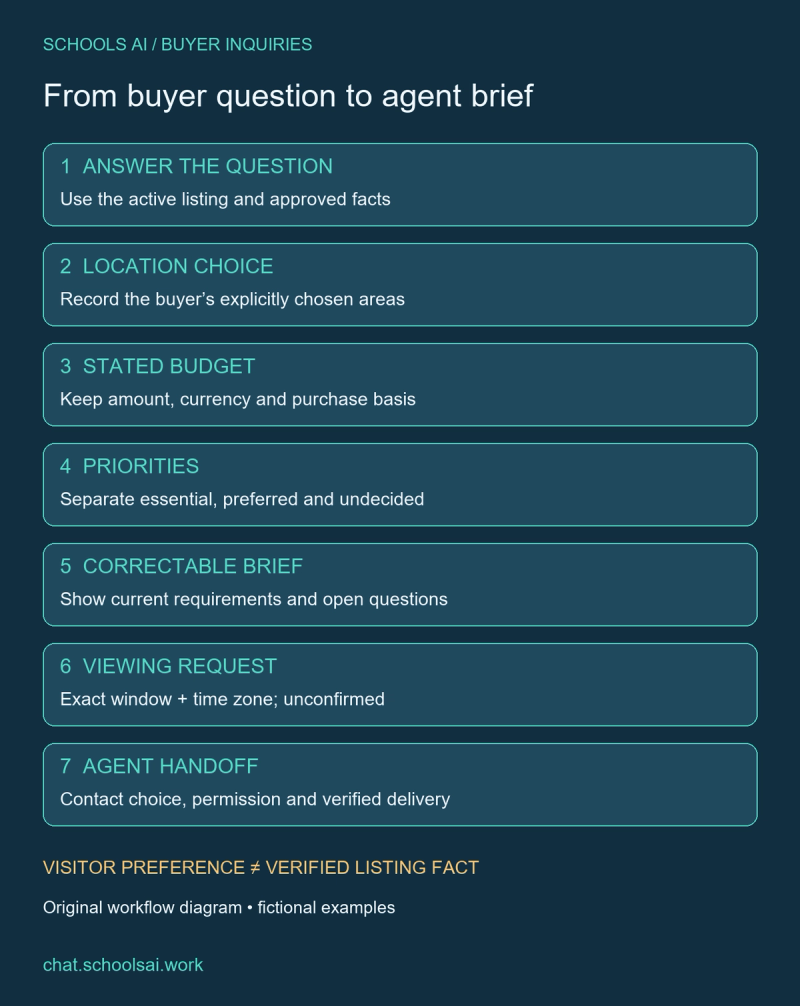
7. Test the buyer brief before inviting inquiries
Repeat this example with the listing reference changed, budget corrected twice, optional location left open, and a viewing request withdrawn. Check that current fields match the visitor’s latest instruction and that unknowns survive delivery. Test a direct request for a person before any contact information is supplied. Include a controlled destination failure using synthetic test details.
Use the existing real estate chatbot test examples for pass/fail checks across the conversation and received record. A useful acceptance condition is simple: a reviewer can identify the buyer’s current request, its source, the unresolved questions, and who owns the next action. Mark any untested connection explicitly instead of treating an illustrative conversation as a successful live run.
Discuss your buyer inquiry workflow with SchoolsAI. Bring approved listing fields, the short brief your agents need, and the questions that require people. Begin with one buyer inquiry path, verify delivery and corrections, and expand only after those steps work in your own environment.
Build a clearer buyer brief
Bring approved listing fields, buyer intake questions and a named handoff owner.
Discuss your buyer inquiry workflow →Keep reading

Real Estate Chatbot Examples: Seven Tests Before You Launch
Seven original prelaunch test cases with fictional data, expected answers and broker handoff checks.

Chatbot for Commercial Real Estate: Capture Clear Property Inquiries
A practical commercial property inquiry workflow with fictional office data, original scripts, clear units and broker review.

Real Estate Chatbot Scripts: Buyer, Seller & Rental Conversations
Original conversation scripts for buyer, seller and rental inquiries, with fictional listing data and clear staff handoff rules.