Real Estate Chatbot Examples: Seven Tests Before You Launch
Seven original prelaunch test cases with fictional data, expected answers and broker handoff checks.

A polished conversation can still leave a real estate team with the wrong property reference, an outdated requirement, or a viewing request nobody received. Useful real estate chatbot examples therefore need more than friendly replies. Each example should show the approved input, an illustrative response, the information that should reach staff, and a clear condition for passing the test. That makes the conversation reviewable before visitors depend on it.
This guide provides seven original tests for a proposed US property inquiry workflow. Every listing, visitor, and exchange is fictional. These are expected behaviors to evaluate, not recorded SchoolsAI customer conversations or a demonstration of an installed integration. For opening language and ordinary buyer, seller, and rental branches, use the existing real estate chatbot scripts. This page focuses on what happens when the conversation changes or the normal path fails.

1. Two similar listings must stay separate
Test input: The approved training record for fictional listing DEMO-A17 describes a two-bedroom condo with one assigned parking space. DEMO-B28 is a different three-bedroom property; its parking information is unverified. Neither record supplies current availability. The visitor asks, “Does B28 include the parking space shown on A17?” This deliberately places two references in one question.
Illustrative response: “Those are separate sample listings. A17 lists one assigned parking space; I do not have verified parking information for B28. Would you like the agent to check B28?” The assistant should not combine attractive features from both records or treat a photo as proof of an included feature. A visitor should be able to ask this basic question without first providing contact details.
Expected staff record: Active property reference DEMO-B28; open question parking; availability unverified; source distinction preserved. Pass only if both the visible answer and the saved summary keep the two properties separate. A correct answer followed by an A17 handoff still fails. If the current page and visitor’s stated reference conflict, ask which property they mean before continuing.

2. A correction must reach the final summary
Test input: A buyer first asks for two bedrooms and a maximum stated budget of $460,000. Later they say, “Please change that to three bedrooms, up to $510,000, and remove the downtown preference.” These are requirements supplied for a fictional conversation, not a finding that a suitable property exists. Do not turn the budget into a lending assessment.
Illustrative response: “I’ll use three bedrooms and a stated maximum budget of $510,000, with no downtown preference. Is there another area you want recorded, or should I leave that open?” The response should acknowledge all three changes without asking the visitor to repeat information that is already clear.
Expected staff record: Bedrooms three; stated purchase budget $510,000; location preference not specified. The old downtown preference must not remain an active filter. Retain useful correction history according to the team’s actual process, but make the current requirement obvious. Pass only after inspecting the received record, not merely the transcript. If there is no connected destination in the test environment, label delivery untested rather than inventing a successful CRM update.

3. Missing information needs an explicit open question
Test input: A rental visitor asks whether a second parking space is available. The approved sample record mentions one assigned space and says nothing about additional parking, fees, or a waiting list. A missing field is different from a verified “no.” The test should catch answers that confidently invent either availability or a prohibition.
Illustrative response: “The sample record lists one assigned space. I do not have verified information about an additional space or its cost. I can preserve that question for the property team.” Do not borrow another building’s policy or suggest that paying a fee guarantees an extra space.
Expected staff record: Question additional parking; answer pending property-team verification; no promised price. Pass when the unknown survives the handoff and the visitor can still request a person. A seller asking for a property value needs the same discipline: preserve the request for an agent without producing an unsupported valuation or net-proceeds figure. This is an information-routing exercise, not an automated decision about housing access or financial terms.

4. A viewing preference remains a request
Test input: A visitor asks, “Can I see DEMO-A17 on Friday?” The assistant has no verified calendar connection, current availability, or access authorization. Ask for the exact date, preferred time window, and time zone. Avoid making the visitor believe that collecting a preference reserves an appointment.
Illustrative response: “I can collect a viewing request for the agent to check. Which Friday do you mean, and what time window and time zone work for you? Nothing is confirmed yet.” After clarification, show the request for correction and ask which contact method the visitor wants used for this inquiry.
Expected staff record: Property DEMO-A17; exact requested date and window; named time zone; appointment confirmed false. Pass when no confirmation message or calendar claim appears without a verified result. Also test a later withdrawal: the summary should say the request was withdrawn. It must not claim a booked event was canceled when no event existed. Check the property inquiry workflow for the broader intake structure.

5. Asking for a person should end the questionnaire
Test input: Halfway through a seller inquiry, the visitor says, “I would rather speak to an agent.” They have not completed optional property details. The test checks whether the assistant respects that request instead of forcing the person through the remainder of the script or classifying them as an unsuitable lead.
Illustrative response: “Of course. I can help you use the team’s verified contact route. Would you like to share a preferred contact method for this inquiry?” If a direct staffed channel is actually available, offer it using approved information. Do not invent an agent’s name, opening hours, response deadline, or a claim that someone is already joining.
Expected staff record: Human help requested; seller inquiry; information provided so far; optional fields not provided. Pass when the automated questionnaire stops and the verified handoff path is offered. Requests involving contracts, financing, complaints, or other questions outside approved property information should also reach appropriate people. The assistant should preserve the question without offering professional advice or deciding anyone’s eligibility.

6. Failed delivery must not look successful
Test input: In a controlled test environment, make the intended handoff destination unavailable. Use synthetic contact information supplied by the team for testing, never a stranger’s real details. The visitor completes an inquiry, but the destination returns a failure or does not provide a verified acceptance result.
Illustrative response: “I could not confirm delivery of this request. Please use the team’s verified contact option, or try again.” The exact alternative depends on information the business has approved. Avoid “The agent has your request” when the only evidence is that the chat interface collected it.
Expected staff record: Delivery failed or unverified; no successful handoff claim; a recoverable inquiry reference if the system actually supports one. Pass only after checking what the visitor saw and what the receiving team can access. Test repeated submission too: two clicks should not silently become two confirmed appointments. Document the observed behavior and resolve it before calling the workflow operational.
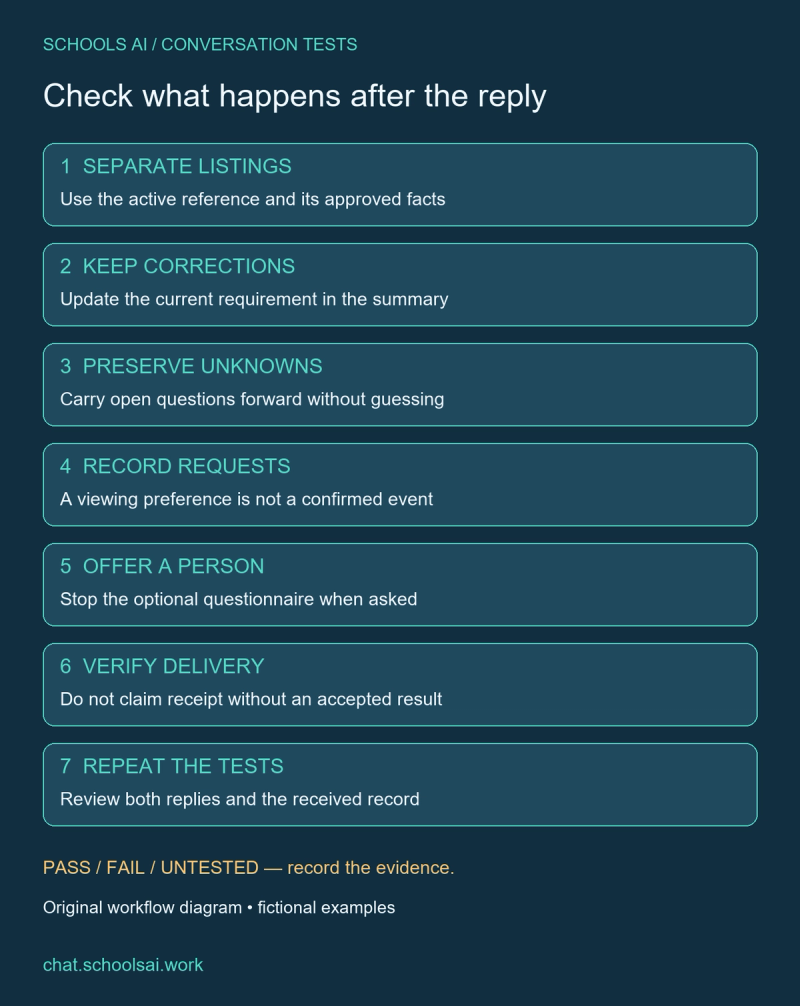
7. Repeat the tests after a meaningful change
Run the same seven cases whenever approved listing fields, instructions, or a connected delivery path change. Include a simple successful baseline, then the ambiguous listing, corrected requirement, missing fact, unconfirmed viewing, human request, and failed delivery. Record the test date, source version, expected response, observed response, received summary, and reviewer. Mark each result pass, fail, or untested; an illustrative script is not evidence of a passed live test.
Each example above supplies fictional inputs and expected states so a reviewer can repeat the checks. They are a testing aid, not an installable integration or a claim that SchoolsAI automatically writes to a particular CRM. Choose a staff owner for unresolved failures and rerun the affected cases after changes. Keep review focused on facts, corrections, visitor choice, and verified delivery rather than a conversation that merely sounds reassuring.
Discuss your real estate inquiry tests with SchoolsAI. Bring a small approved listing set and the summary your team needs to receive. Verify each connection in your own environment before describing bookings, notifications, or follow-up as working features.
Check the whole inquiry path
Bring approved listing records, test cases and the summary your team needs.
Discuss your real estate inquiry tests →Keep reading

Chatbot for Commercial Real Estate: Capture Clear Property Inquiries
A practical commercial property inquiry workflow with fictional office data, original scripts, clear units and broker review.

Real Estate Chatbot Scripts: Buyer, Seller & Rental Conversations
Original conversation scripts for buyer, seller and rental inquiries, with fictional listing data and clear staff handoff rules.

AI Chatbot for Real Estate Agents: Qualify Leads & Capture Viewing Requests
A practical inquiry workflow with fictional listing data, original conversations, and clear rules for agent follow-up.