Real Estate Chatbot Scripts: Buyer, Seller & Rental Conversations
Original conversation scripts for buyer, seller and rental inquiries, with fictional listing data and clear staff handoff rules.

A useful real estate chatbot script gives the visitor a clear next step and gives the agent enough context to continue. It should answer the question that brought someone to the page, ask only relevant follow-up questions, and make uncertainty visible. A buyer asking about a showing needs a different conversation from a homeowner considering a sale or a renter checking a listing.
The scripts below are original fictional examples for a US real estate team. They are proposed conversation patterns to configure and test, not a demonstration of a deployed SchoolsAI integration. Replace every sample property, date, contact route, and staff expectation with approved information before using them. A viewing request becomes an appointment only after an authorized confirmation.
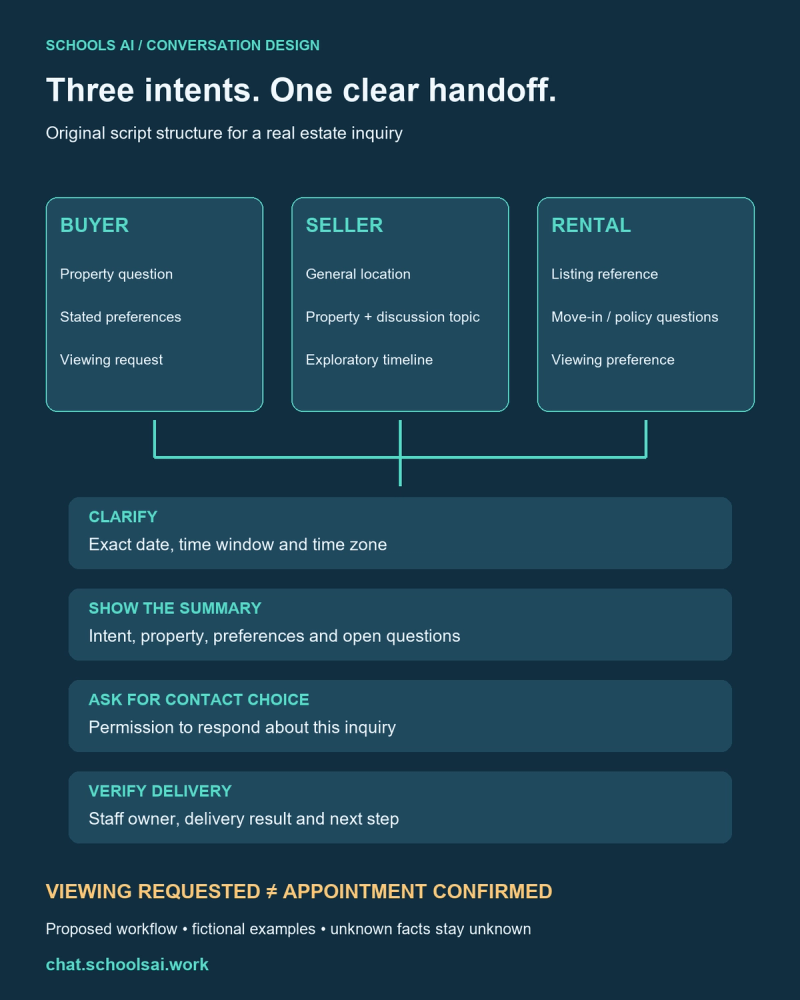
Choose the right conversation branch
Start by identifying the visitor’s purpose. If the page already identifies the property, carry that context into the conversation instead of asking for it again. If the visitor writes a detailed message, preserve the information they supplied rather than restarting a questionnaire.
Assistant: “I’m an automated inquiry assistant. Are you asking about a property, planning to sell, or looking for a rental? You can also ask for a person.”
Offer a short answer or a relevant next question. Someone who only wants a listing detail should not have to provide a phone number first. Let visitors skip optional questions, correct a summary, and request staff at any point. Keep the same meaning across website chat and messaging channels, while adapting button labels and message length to the interface.

Buyer script: turn a question into a viewing request
Use an approved test record: BUY-208, a fictional detached home in Austin, Texas, with three bedrooms and two bathrooms. Its sample asking price is $475,000. The HOA fee is unknown, and current availability requires staff verification. These are training values, not current inventory.
Buyer: “Is BUY-208 available? Could we see it next Saturday?”
Assistant: “The team needs to verify its current availability. I can collect your preferred viewing window for an agent to check. Do you mean Saturday, October 31, 2026, and what time zone should we use?”
Buyer: “Yes, around 11 a.m. Central. We need three bedrooms and want to stay below $490,000.”
Assistant: “I’ve noted three bedrooms, a search budget below $490,000, and October 31 around 11 a.m. Central. That is a viewing request; the agent still needs to confirm access and timing. Do you have a question they should check first?”
Buyer: “What is the HOA fee?”
Assistant: “That fee is missing from the approved sample record. I’ll include it as an open question. What name and contact method would you like to use for this inquiry?”
Buyer: “Taylor. Email [email protected].”
Assistant: “May the team use that email to respond about BUY-208 and your viewing request?”
After permission, show the summary for correction. Do not ask the buyer to upload financial documents or determine whether they qualify for a home. If they ask about financing, capture the question for the appropriate person without producing a loan recommendation.

Seller script: request a conversation, not a valuation
A seller intake should help an agent understand the property and the owner’s intended next step. It should not invent a sale price, imply an appraisal, or promise a deadline. Start with general details; ask for an exact address only when the team has a clear need and an appropriate collection process.
Seller: “We may sell our townhouse this winter. Can you tell us what it is worth?”
Assistant: “I can collect a request for an agent to discuss your property. I can’t provide an appraisal or a verified sale price. Which city or area is it in, and what would you like to discuss first?”
Seller: “Austin. We want to understand the process before deciding. It has two bedrooms.”
Assistant: “Understood: an Austin townhouse, two bedrooms, and a conversation about the selling process before you decide. Is winter a firm target or an early idea?”
Seller: “An early idea. Please email me.”
Assistant: “What email should the team use, and may they use it to respond to this request?”
Preserve “exploring” as the timeline. Do not convert it into an urgent lead or assume the visitor has decided to list. A question about an existing contract, negotiation, or tax consequences belongs with a qualified person. The bot can record that topic without drafting advice.

Rental script: clarify the listing and requested timing
Keep a rental inquiry separate from an application or tenant screening. This example uses RENT-309, a fictional two-bedroom apartment. The sample record has no verified move-in date or pet-policy answer. The assistant collects questions and viewing preferences without deciding eligibility.
Renter: “Can I move into RENT-309 in December? Is a cat allowed?”
Assistant: “The team needs to verify the move-in date and pet policy for that listing. I can pass along both questions. Would you like listing information first or to request a viewing?”
Renter: “A viewing next Tuesday after work.”
Assistant: “Do you mean Tuesday, October 27, 2026? What time window and time zone work for you?”
Renter: “After 5:30 p.m. Central. Email is easiest.”
Assistant: “I can record October 27 after 5:30 p.m. Central as your preference. Staff must confirm availability and access. What email would you like to use, and may the team reply about this inquiry?”
Do not silently reinterpret “after work” as a fixed appointment. Do not request a Social Security number, income documents, credit history, or an application fee in this conversation. If the visitor asks about the application process, route them to the team’s verified application information.

Write the unknown-answer and human-handoff branches
Prepare a response for missing, stale, and conflicting information. “I don’t have a verified answer about that detail. Would you like me to include it for the agent?” is more useful than a confident guess. Include the listing ID and the exact question in the handoff so staff can identify the gap.
For a human request, use a direct response: “I can help collect a request for the team. What contact method would you prefer?” Do not force the visitor through the remaining intake questions. Show a response expectation only if the team can actually meet it; an after-hours assistant should not promise an immediate callback by default.
Separate receipt from delivery. Before the intake destination confirms success, say “Please review this summary.” After a verified successful handoff, an acknowledgment can say the request was received. If delivery fails, explain that it was not delivered and offer the team’s verified alternative contact route. Never display a success message simply because the chat ended.

Give the agent a compact, correctable summary
Use a consistent structure across all three branches: intent, property reference or general location, visitor-stated requirements, requested timing and time zone, chosen contact method, inquiry-specific permission, open questions, and delivery status. Keep unknown values explicitly unknown. Record a viewing request separately from appointment confirmation.
For BUY-208, the summary would retain Taylor’s three-bedroom preference, budget below $490,000, October 31 around 11 a.m. Central, and the missing HOA fee. Set appointment confirmation to false. For the seller, preserve the exploratory winter timeline. For RENT-309, keep both policy and move-in questions open until staff verifies them.
Read the summary back in plain language. If the visitor changes an email or withdraws a request, update the record and show the correction. Do not claim that a calendar event was changed or canceled unless that action has a verified result.

Test the scripts before inviting inquiries
Role-play each branch with a colleague. Test an unknown fee, an ambiguous date, a skipped budget question, a request for a human, a corrected contact address, and failed delivery. Check both what the visitor sees and what the agent receives. Give each unresolved request an owner and a follow-up status.
Use the real estate inquiry workflow guide to connect these scripts to approved listing data and staff review. These examples are copy you can adapt; actual integrations, delivery channels, and scheduling behavior still need configuration and verification.
Discuss your conversation workflow with SchoolsAI. Bring your approved listing fields, existing intake questions, and a named handoff owner so the conversation can be designed around the work your team actually performs.
Build a conversation your team can use
Bring approved listing fields, intake questions and a named handoff owner.
Discuss your conversation workflow →